Turn 2 days of janitorial reporting into
30 minutes
Janitorial inspection reports, GPS time tracking, issue management and client delivery — all in one app.
From on-site staff input to auto-generated PDFs, CSV export and secure owner sharing.
Free for 2 properties · no credit card · start in 30 seconds
今日の打刻
未対応の不具合
今月の出力
登録不要・30秒で体験
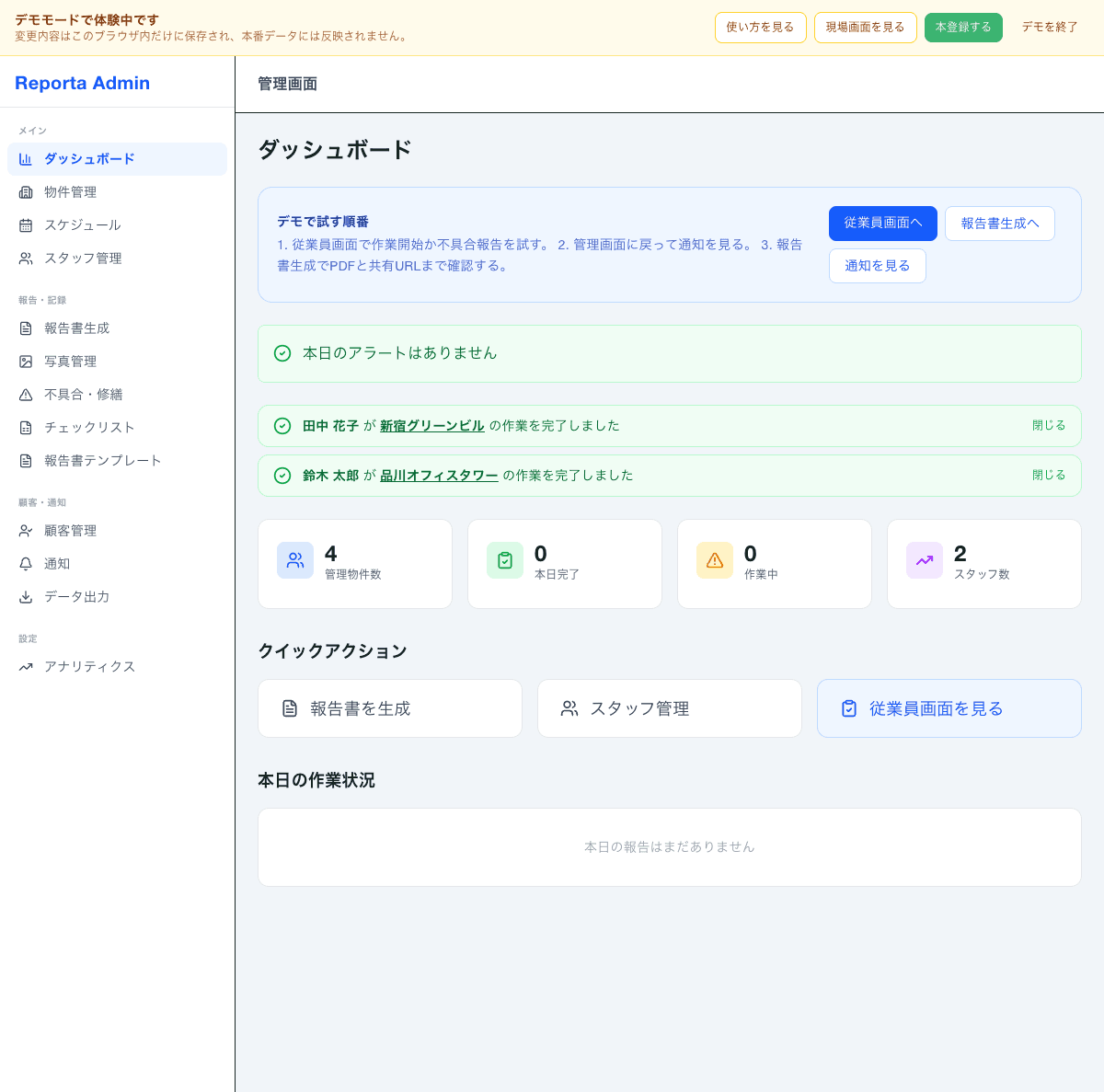
こんな管理画面をすぐに試せます
デモモードでは実際の管理画面をそのまま操作できます。データは保存されないので安心してお試しください。
アカウント登録不要・クレカ不要・30秒で開始
Does any of this sound familiar?
Common challenges we hear from cleaning companies
Month-end reporting eats 2 whole days
Collect photos on chat, paste into Excel, format in Word, print and mail — the same loop every month.
Chat photos scattered and hard to find
Unclear which property a photo belongs to, dates and locations all over the place. Same back-and-forth every month.
Excel report formats are inconsistent
Every staff member uses a different template, quality varies, and you're unsure whether to hand it to the owner as-is.
"Did you really clean it?" — you get doubted
Photos alone aren't trusted. Without time and location evidence, there's no way to prove the work was done.
Reporta solves all of this
Features
Reportaの特長
Photo work reports
Just take a photo on your phone and you're done. Drafts save even in low-signal areas and send when you're back online.
GPS check-in / check-out
Tap start and end — work time and location are logged automatically, leaving a clear on-site evidence trail.
Monthly PDF generation
Pick a property and period, one click. Photos and check results are laid out automatically into a PDF.
No app install needed
Runs in the browser, so rolling out to staff is painless — no app store hoops to jump through.
Issue & repair tracking
On-site issue reports with photos and GPS are gathered in the admin screen, and status updates flow in the same place.
Notification center
Completions, issues, updates, schedules and missing items — nothing slips past admins or staff.
Client & property management
Edit client info, link properties to accounts, keep contacts tidy — all in one place to streamline recipients.
CSV export
Export monthly reports, per-property history and per-staff results. Formats Excel can use directly.
Simple pricing
No setup fees. Pricing scales with properties, not staff — unlimited seats.
Annual plans save you two months.
Free
For teams that want to try it with up to 2 properties
- Up to 2 properties
- Photo work reports
- GPS check-in & location log
- Issue reports
Starter
Best for small cleaning companies
$55/mo (billed yearly)
- Up to 20 properties
- Everything in Free
- Client management & property linking
- Admin notification center
Growth
For growing cleaning companies
$110/mo (billed yearly)
- Up to 50 properties
- Everything in Starter
- Detailed reports
- Priority support
Reportaで解決できること!
Reports, check-ins and issues group by property automatically
See missing reports and issue updates instantly via notifications
Export PDF and CSV by picking a property and period
Manage client info and property links in one place
Owners can check anytime via URL
Daily to monthly flow with Reporta
Report & check-in on site
Track status via notifications
Generate PDF / CSV
Share URL with client
Frequently asked questions
No, never. The 2-property Free plan is free forever and we never ask for payment details during signup or while you use it. You only enter payment info when you choose to upgrade to a paid plan.
Yes. Accounts created during beta carry over to GA with data and settings intact. The first-5-companies beta perks (price lock, direct support) continue after GA as well.
All traffic and storage is encrypted on Google Firebase (Google Cloud). Property data, photos, and work history are logically isolated per company so no other company can access them. Data is fully deleted within 30 days of cancellation.
Yes. The core actions are just "check an item", "take a photo", and "tap a button". If someone can use a chat app, they can use Reporta — and we walk teams through it at rollout.
Yes. Photos and checklists can be recorded offline, and everything uploads automatically once the connection comes back.
Reporta's auto-generated PDF includes everything a cleaning report needs: photos, checklist items, timestamps, and notes. We'll walk through differences against your current format during the demo or when you request info.
Yes. Staff tap Start / End to log time, with GPS captured automatically. Elapsed time is visible during work, so you can manage site operations and build evidence at the same time.
Yes. Monthly reports, per-property history, and per-staff results can all be exported as CSV. The format is Excel-friendly so it drops straight into internal spreadsheets.
Just send a URL to the owner. No login required — they can view it anytime from phone or PC, and download the PDF. It's view-only, so data can't be tampered with.
Sign-up is quick, and if you only have a few properties you can start using it the same day. How long it takes to prepare checklists and client records depends on the property count.
Yes. You can cancel anytime. Your data remains downloadable for 30 days after cancellation, and you can always drop back to the free single-property plan.
Reporta is purpose-built for patrol cleaning and covers the full loop from on-site input to owner delivery. Because GPS check-ins, issue tracking, notifications, and CSV exports are all connected, you're replacing a whole workflow — not just the reporting step.
Let's map Reporta onto your operation
— start with a quick chat?
We'll help you figure out where to start — month-end load, owner delivery, time tracking, or issue handling. Typical reply within 1 business day.
15–30 min · no hard selling
For direct consultation:takanoj19920616@gmail.com